

The new version of VCTool introduces DoIP simulation support in the ECU Simulator module and adds the ability to bind a hardware security key to a user account.
DoIP support allows simulation of vehicles on platforms where diagnostic communication is performed exclusively via the DoIP protocol. More details about configuring and using DoIP simulation are available in the following article: link.
In addition, hardware security key support has been implemented. Key binding is available through the Mobility Add-on module (not included in subscriptions). YubiKey devices supporting Smart Card (PIV) technology are supported. The hardware key itself is not included in the module price and must be purchased separately from the manufacturer or authorized distributors.
Once the key is linked, the account can be used on any PC without performing a re-binding procedure. However, only one active workstation is allowed at a time.
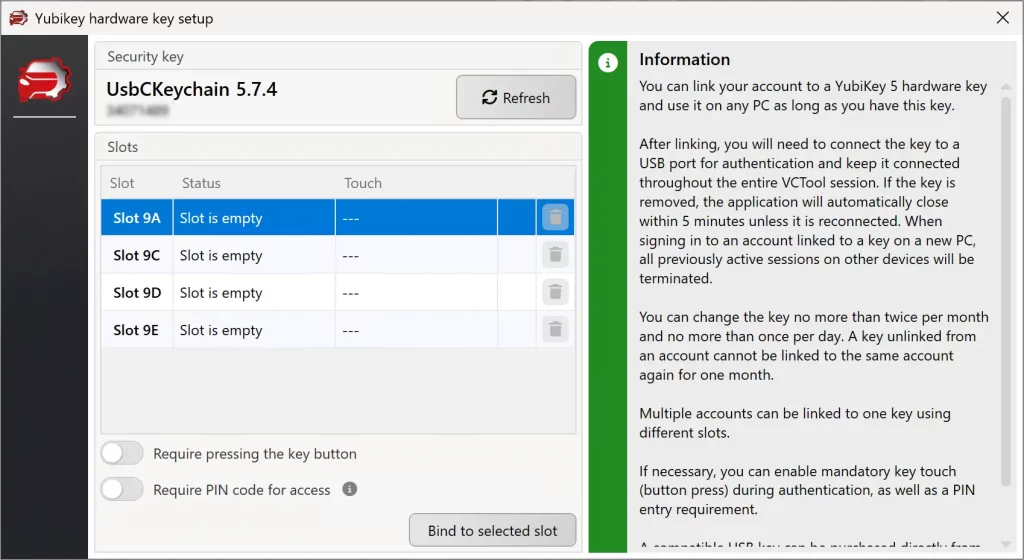
To bind a key, log in to VCTool, open the account settings, and click the “Bind key” button. The YubiKey must be connected to the PC during this process. You will then need to select the slot that will be used for authentication (any available slot can be chosen). During configuration you may enable the touch requirement, which means that each login must be confirmed by physically touching the key. You may also enable PIN verification, in which case a PIN code will be required during every authentication. The PIN code can be set or modified using the Yubico Authenticator application.
IMPORTANT: the touch requirement and PIN verification settings are defined before the slot is configured and cannot be changed afterward. Please take this into account when configuring the key.
The key can be unlinked from the account at any time. However, once unlinked, the same key cannot be linked again to the same account for 1 month from the moment of unlinking, including requests to technical support. Linking a new key is allowed no more than once per 24 hours and no more than twice per calendar month.
Please note: a key linked to an account must remain connected to the PC for the entire VCTool session. If the key is removed, the application will be locked, and if the key is not reconnected within 2 minutes, VCTool will automatically terminate regardless of the current operation.
ATTENTION! Starting May 1, 2026, to run in a virtual machine it will be mandatory to have the Mobility Add-on module and a hardware dongle linked to the account. Without the module/dongle, launching VCTool from a virtual machine will be impossible!

